Rolling/Aux Data

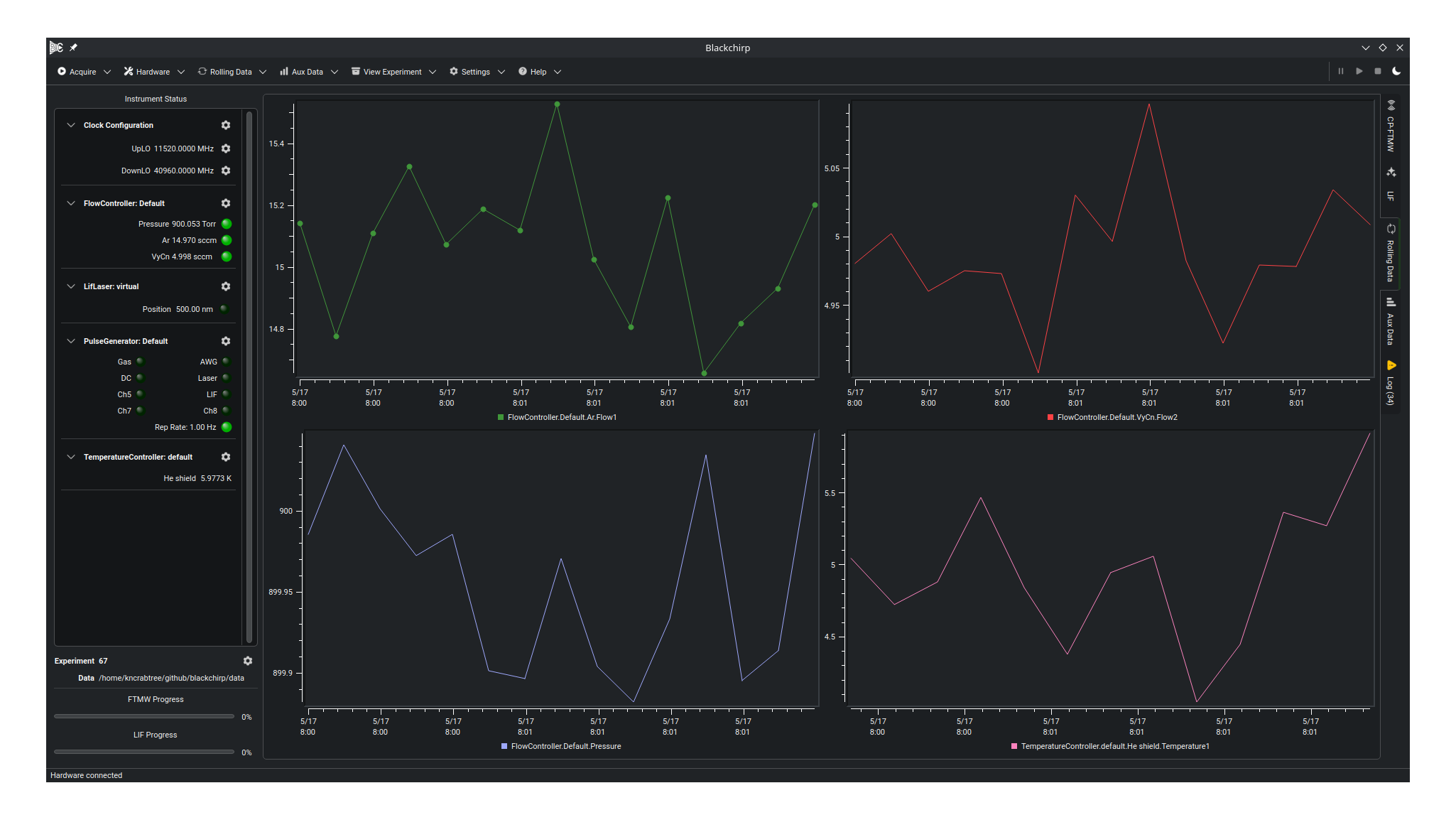
Rolling data and Aux data both refer to signals that are periodically recorded as a function of time, and they are plotted against the date and time the measurement was taken. Rolling data is taken as long as Blackchirp is running, while aux data is associated with a particular experiment, and is only recorded during the time that the experiment is active. An example is shown in the screenshot above, with several curves from a FlowController and a TemperatureController plotted side by side across four panels. Only some pieces of hardware support rolling/aux data; details are available on each item’s entry on the Hardware Details page.
Entries on the main toolbar (see User Interface Overview) for both rolling and aux data allow customization of the number of plots and offer a control to autoscale all plots. A curve can be moved from one plot to another by right-clicking the plot where the curve is presently located, selecting it from the Curves menu, and choosing the Move to plot option. Plots are numbered from left to right, top to bottom.
Each particular curve that appears on these plots is associated with an identifier of the form:
HardwareObject.Label[.DisplayName].SignalID
The Label is the user-defined name assigned to the hardware entry in the active loadout (for example, Main or default), distinguishing one device from another when more than one of the same kind is configured.
The DisplayName, if present, is the name that is displayed in the legend of the plot where the curve appears.
For example, in the TemperatureController object, the DisplayName is set to the name entered in the TemperatureController hardware control settings, and likewise for the FlowController and IOBoard.
The identifier is used to refer to the particular trace when data are logged to disk, as discussed further below.
Examples of identifiers are:
TemperatureController.default.He shield.Temperature1
FlowController.Main.Ar.Flow1
FlowController.Default.Pressure
Configuring Rolling Data
By default, rolling data is disabled.
Enabling rolling data is accomplished by selecting the appropriate hardware entry in the Hardware Menu, enabling channels if applicable, and setting the rollingDataIntervalSec setting to a positive integer.
The value entered for that setting is the time between data points, in seconds, and it can be set to different values for each piece of hardware if desired.
Rolling data is continually logged to disk, so a short interval between readings increases disk usage.
The interval can be changed at any time as needed, except during an experiment.
In addition, in the Rolling Data menu on the main toolbar (see User Interface Overview), the minimum amount of history displayed in the program can be changed. Blackchirp records data until the amount of displayed history reaches 150% of the selected history duration. At that time, all data points older than the requested history duration are discarded. For example, if the history is set to 12 hours, then once 18 hours worth of data have been recorded, the oldest 6 hours’ worth of points are discarded. This only applies to the data shown on screen; the discarded data points are still available for later viewing on disk.
Aux data is configured by setting the Aux Data Interval option to the desired sample interval when starting a new experiment. The aux data interval need not be the same as the rolling data interval, but all enabled aux data sources will be recorded during the experiment regardless of whether they are currently configured for rolling data. A few extra data sources are available as aux data, such as the total number of FTMW shots acquired over time, and information related to phase correction algorithms (if enabled). Aux data channels are used as the inputs for Experiment Validation conditions that can automatically abort an experiment if data falls outside a desired range.
Rolling Data Storage
Blackchirp logs rolling data in the rollingdata subdirectory of the current Data Storage Location (see Data Storage).
Inside that folder, data are organized into one folder per year that contains folders for each month.
Within the folder for a particular month, Blackchirp writes a csv file per rolling data source.
If the identifier contains an optional display name, data is appended to the existing CSV file if the same display name was previously used.
Otherwise, a new file is created when the display name changes.
The data format of the rolling data CSV file is shown below for a file titled TemperatureController.default.He shield.Temperature1.csv:
timestamp;epochtime;TemperatureController.default.He shield.Temperature1
Thu Apr 30 22:21:54 2026;1777612914;5.67251737347164
Thu Apr 30 22:21:58 2026;1777612918;4.063626296316124
Thu Apr 30 22:22:03 2026;1777612923;5.195895633778912
Thu Apr 30 22:22:08 2026;1777612928;4.853938880170417
Thu Apr 30 22:22:13 2026;1777612933;4.933494280202041
Thu Apr 30 22:22:18 2026;1777612938;4.9915656738765
Thu Apr 30 22:22:23 2026;1777612943;5.929736158638056
The first column contains the date and time of the data point in string format, while the second is the Unix epoch time.
The final column contains the data value.
There may be gaps in time within the files if Blackchirp was shut down, or if the name assigned to this channel of the temperature controller was changed and later reset to the same value (He shield).
Aux data has a similar format, and it is discussed on the General Experiment Files page.