Validation Settings
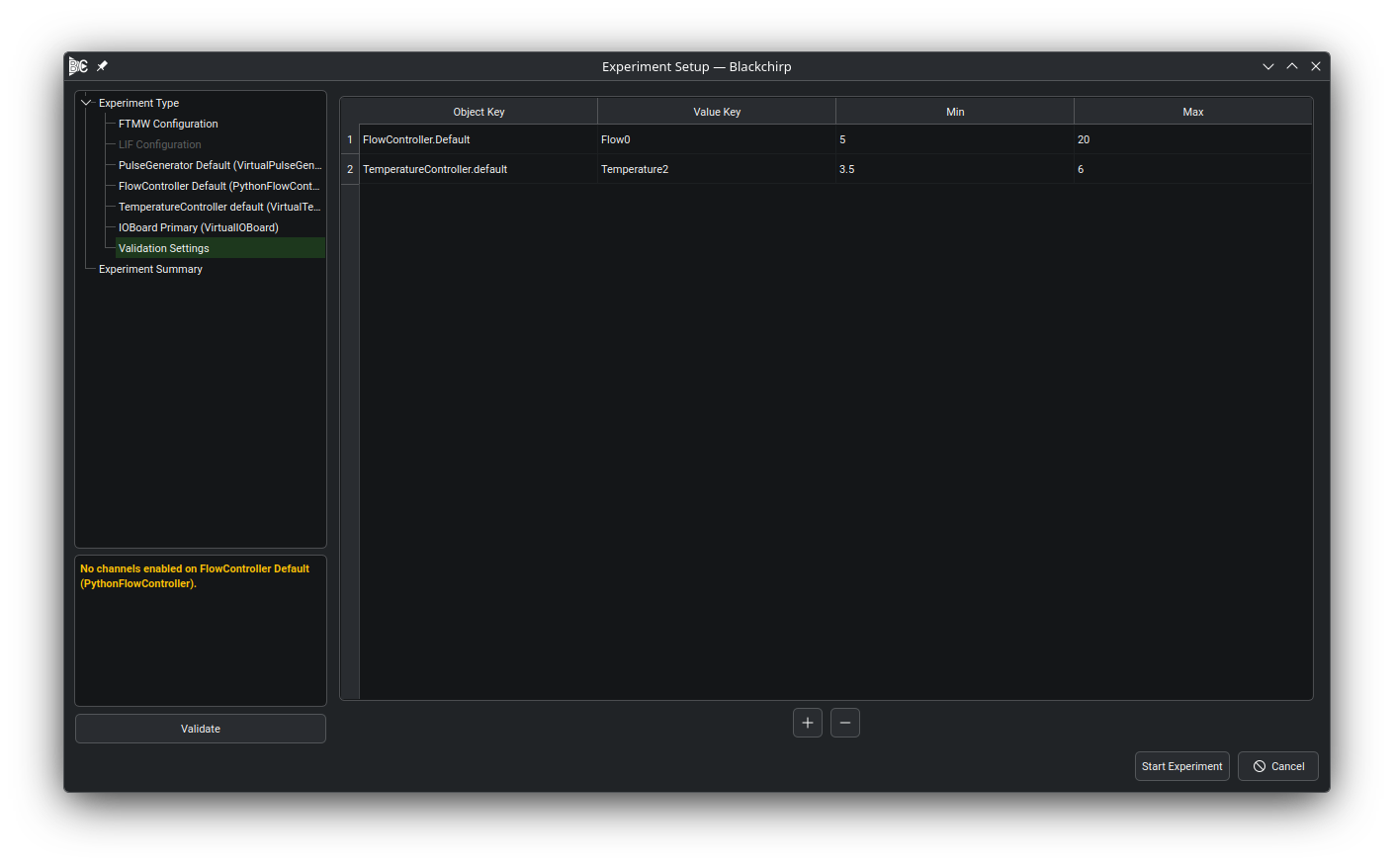
The Validation Settings page of the experiment wizard allows conditions to be defined that automatically terminate an experiment. Every time Auxiliary Data is read (see Common Settings), any value that falls outside the specified range causes the experiment to abort immediately. This prevents poor-quality data from being averaged in and, when used together with sleep mode, avoids unnecessary sample consumption if an operating parameter changes substantially.
A validation condition is associated with an object key (identifying a piece of hardware in the hardware map) and a value key (a particular reading reported by that device).
Object keys take the form HardwareType.label — for example, PulseGenerator.myPGen or FlowController.mks946 — combining the hardware type with the user-assigned label from the loadout.
Clicking the object key cell shows a dropdown listing every hardware object that exposes validation readings; clicking the value key cell then shows the readings available for that object.
Once the keys are selected, enter the minimum and maximum allowed values as floating-point numbers.
The experiment aborts if the measured value is less than the minimum or greater than the maximum.
To add a condition, press the + button at the bottom of the page.
To remove a condition, select the row and press the - button.
Note
Only hardware objects that override validationKeys() appear in the object-key dropdown.
If a device is not listed, it does not expose any readings to the validation system.