FTMW Experiment Setup
The first page of the
Experiment Setup dialog hosts the
FTMW group, which selects the FTMW acquisition type and its
parameters. When LIF is enabled, an LIF group is shown alongside
it; the LIF controls are described on the
LIF Experiment Setup page. The
Common Settings group at the top of the page is described under
Common Settings.
The acquisition type determines how many FIDs are recorded and, in some cases, how the spectrum is partitioned into multiple segments. For the LO Scan and DR Scan types, the scan configuration controls appear inline below the type selector; no separate page is shown for those settings.
Available acquisition types are:
Below the type-specific controls, the FTMW group also contains
real-time processing options:
Phase Correction
(adjusting for slow temporal phase drift during long averages) and
Chirp Scoring, which
attempts to reject “weak” chirps.
Target Shots
Target Shots is the default and most straightforward type of acquisition.
In this mode, FIDs are recorded and averaged until the desired number of shots (entered in the Shots cell of the Shot Settings table) is reached.
This is considered a single segment acquisition: only a single Rf/Clock configuration is used during the experiment.
Target Duration
Target Duration mode records and averages FIDs until a period of time has elapsed.
The desired acquisition duration is entered in the Duration cell of the Duration Settings table, and the Est. End cell below it shows an estimate of the experiment completion time.
Note
The estimated completion time is computed simply by adding the duration to the current time, and does not account for the time spent configuring the remainder of the experiment and initializing. The actual experiment timer begins after the experiment has been successfully initialized.
This mode is also a single segment acquisition.
Forever
In Forever mode, FIDs are recorded and averaged until the user hits the abort button or a critical hardware failure occurs.
The Forever table in place of an acquisition-objective field carries only an informational note.
Like Target Shots and Target Duration, this is a single segment acquisition.
Note
Blackchirp supports averaging up to \(2^{64} - 1 = 18446744073709551615\) shots. However, each FID data point is stored as the sum of raw digitizer counts and therefore overflow of an FID data point may occur before this limit is reached. See FID CSV files for more details.
Peak Up
Peak Up mode acquires and averages FIDs until a target number of shots is reached, but does not stop at that point. Processing continues as a modified moving average, which is a special case of an exponentially-weighted moving average. The average can be reset and the number of shots included in the average can be changed during the acquisition with the controls on the CP-FTMW tab.
Warning
Unlike the other acquisition modes, Peak Up mode experiments are not saved to disk. Once a new experiment has been started, the results from the Peak Up mode experiment are discarded. Be sure to export any data you wish to save manually!
Another key difference between Peak Up mode and the other acquisition modes is that most program controls (hardware, settings, etc) remain unlocked and can be modified without stopping the acquisition. For example, gas flow rates or pulse timings may be modified and the results monitored in real time.
Warning
In certain situations (e.g., when a delay generator produces a protection pulse for a switch), it may be possible for the user to enter settings that are inappropriate. Use caution when changing settings during a Peak Up mode acquisition.
Note
Under the hood, Blackchirp applies an 8-bit left shift to all digitizer values during peak-up mode, equivalent to multiplying each ADC value by 256. This creates extra bits that are needed for the rolling average operation.
LO Scan
The LO Scan mode implements a version of segmented CP-FTMW spectroscopy in which a certain number of FIDs are acquired and averaged, then the upconversion and/or downconversion local oscillators are stepped.
By sampling a variety of LO frequencies, the spectral range covered by the instrument can far exceed the instantaneous bandwidth of the FTMW digitizer, allowing CP-FTMW spectroscopy to be performed with (comparatively) inexpensive hardware.
On the CP-FTMW tab, each frequency segment can be viewed individually, and algorithms are available for stitching together the entire spectrum and deconvolving dual sidebands (see the linked page for more details about these algorithms).
As a multi-segment acquisition type, Blackchirp writes a backup at each segment boundary, so the Backup Interval setting in Common Settings has no effect.
The number of shots collected at each LO step is set in the Shots/Point box within the LO scan configuration below the type selector.
Note
Before the LO Scan configuration controls become accessible, both an UpLO and a DownLO clock source must be assigned in the RF Configuration (or, if the Common LO box is checked, only the UpLO needs to be set). The exact frequencies entered for those clocks are unimportant, as they are overridden by the scan parameters.
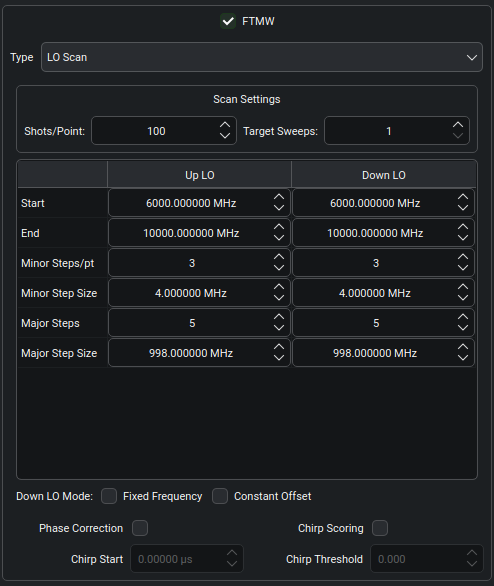
The LO scan widget is laid out as a Scan Settings row at the top, an LO scan table that compares the Up LO and Down LO columns side by side, and a Down LO Mode row at the bottom.
The Scan Settings row contains the Shots/Point and Target Sweeps boxes.
Blackchirp acquires the indicated number of Shots/Point at each LO frequency specified.
The complete set of LO frequencies is considered one sweep, and Blackchirp returns to the beginning LO configuration and resumes integrating until the desired number of Target Sweeps is reached.
When Blackchirp repeats a segment, the new FIDs are automatically averaged together with the ones from the previous sweep(s).
If the UpLO and DownLO correspond to the same hardware output, the entire Down LO column is disabled.
Blackchirp divides the scan range into major and minor steps.
Essentially, at each major step, a series of measurements can be made with slightly shifted LO positions to assist with sideband deconvolution.
The LO is incremented by the minor step size for each minor step associated with the indicated major step.
In the screenshot above, the Up LO covers the range from 6000 MHz to 10000 MHz in 5 major steps of 998 MHz plus 3 minor steps of 4 MHz per major step.
The major steps therefore work out to 6000, 6998, 7996, 8994, and 9992 MHz; at each major step value, 3 minor steps are recorded separated by 4 MHz, for a total of 15 (3×5) steps and a final endpoint of 10000 MHz.
As the Start, End, and major/minor steps cells are adjusted, some of the other cells’ values are updated to keep the range consistent.
The Down LO column is configured similarly.
As the number of major or minor steps is changed, the Down LO step counts and step sizes are also adjusted so the number of steps matches the Up LO and the step sizes remain consistent with the indicated range.
Two checkboxes in the Down LO Mode row modify this behavior.
If the Fixed Frequency box is checked, the Down LO is not changed during the acquisition; its frequency remains at the Start value, and all other Down LO cells are disabled.
If the Constant Offset box is instead checked, the Down LO frequency at each step is set to maintain a constant difference from the Up LO, equal to the difference between the Down LO and Up LO start frequencies.
DR Scan
In a DR Scan (double resonance), FIDs are recorded while a second DR Clock source is scanned across a desired frequency range in a series of steps.
The purpose of this scan mode is to monitor the intensity of one or more transitions as a function of the DR Clock frequency: when two transitions share a common state, the intensity of a line may be depleted or enhanced, depending on the pulse powers and timings.
Like the LO Scan mode, this is a multi-segment acquisition mode.
Blackchirp writes a backup at each segment boundary, so the Backup Interval setting in Common Settings has no effect.
The number of shots at each DR step is set in the Shots Per Step box within the DR scan configuration below the type selector.
Note
A physical clock source must be assigned to the DR Clock role in the RF Configuration before DR Scan parameters can be configured.
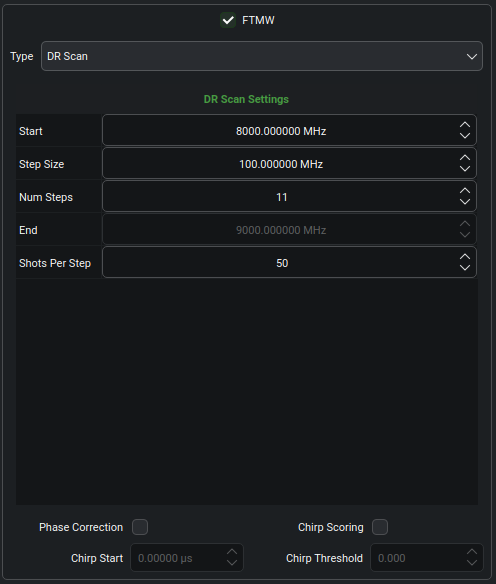
To set up a DR scan, enter the desired Start frequency, Step Size, Num Steps, and Shots Per Step.
The End box updates automatically to show the final DR frequency.
When viewing the DR Scan on the CP-FTMW tab, peak intensity as a function of DR frequency is not directly displayed.
Instead, it is recommended to use the FT1 - FT2 plot mode, as discussed in more detail on that page.
Phase Correction
Time-domain averaging requires that FIDs are mutually in phase.
Locking all oscillators to a common reference (a rubidium clock or
similar stable source) typically achieves this, but slow phase drift
can still accumulate over long acquisitions due to ambient temperature
swings and similar perturbations. Checking the Phase Correction
box enables an algorithm that compensates for slow drift.
The algorithm requires that the chirp is visible — and unsaturated — within the digitizer record. Switch leakage is often sufficient; a directional coupler or SPDT switch can also route an attenuated copy of the chirp around a diode limiter / protection switch. Blackchirp locates the chirp within the FID (see below), then cross-correlates the chirp in each new record against the current averaged chirp once at least 20 FIDs have been recorded, sweeping trial shifts of up to a few points to find the maximum. The shift is usually 0, but a small nonzero value can accumulate over time. The current shift is updated only when the figure of merit improves significantly; an error is raised if the shift exceeds 50 points.
If the Chirp Start box is set to Automatic, Blackchirp assumes that the digitizer is triggered at the start of the protection pulse.
The chirp start is then set to the sum of the pre-chirp protection and pre-chirp delay settings entered on the Chirp Setup page, and the chirp end is determined from the chirp duration entered on that page.
These computed values will be displayed on the FID plots displayed on the CP-FTMW tab.
If they are not correct, you can override the chirp starting time by entering the actual chirp start you observe into the Chirp Start box.
The duration still comes from the Chirp Setup value.
Chirp Scoring
Occasionally, amplifiers may show significant shot-to-shot jitter in the chirp amplitude.
By enabling the Chirp Scoring feature, Blackchirp will compute the squared sum of the chirp embedded in the FID record (as described above) and compare it to the squared sum of the averaged chirp.
If the new value falls below the fraction of the averaged chirp value indicated in the Chirp Threshold box, the FID is rejected.
Higher values of the threshold result in more strict acceptance criteria.
Similar to the Phase Correction algorithm, the chirp scoring routine requires that the chirp be visible and unsaturated within the digitizer record, and its position may be manually adjusted with the Chirp Start box.
Warning
Setting the chirp threshold too high will result in a large fraction of chirps being rejected, and an acquisition may therefore appear to stall.