LIF Experiment Setup
When the LIF module is enabled in the Application Configuration (see Application Configuration), the first page of the Experiment Setup dialog gains an LIF group alongside the FTMW group covered on the FTMW Experiment Setup page. The LIF group defines the scan-axis parameters and options for the laser scan; channel and gate configuration live separately in the LIF Configuration (opened from Hardware → LIF Configuration), where shots-per-point and digitizer settings are also configured.
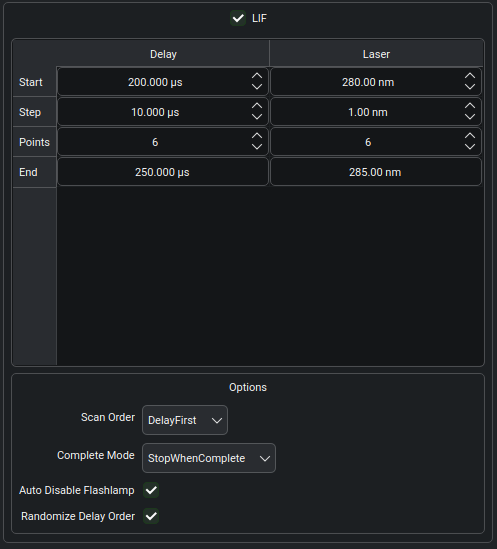
The LIF group is divided into a scan-axes table that compares the Delay and Laser columns side by side, and an Options panel below it. The LIF checkbox at the top of the group enables or disables LIF acquisition for this experiment; when unchecked, all controls in the group are inactive and no LIF data are recorded.
Scan axes
The scan-axes table holds four parameters for each axis:
Start — the position at the first point.
Step — the step size between consecutive points.
Points — the number of points along the axis.
End — the position at the last point, computed from
Start + (Points - 1) * Step. This row is read-only and updates as the other three values change.
The Delay column controls the timing axis (in microseconds) — the time between the laser pulse and the detection gate, set on a dedicated pulse-generator channel. The Laser column controls the wavelength axis; the units displayed (here nm) are determined by the connected laser hardware driver.
To perform a fixed-delay acquisition (scanning only the laser
frequency), set the Delay column’s Points to 1 — the End row
tracks Start. To perform a fixed-wavelength acquisition (scanning
only the delay), do the same on the Laser column. Both axes can be
active simultaneously; Blackchirp then steps through all combinations
of delay and laser positions, collecting the configured number of
shots at each combination. The shots-per-point value is set on the
LIF Configuration, not in the wizard.
Options
The Options panel controls the order and behavior of the scan.
- Scan Order
Controls which axis is the outer loop during acquisition.
DelayFirst— the delay axis is the outer loop; for each delay value, Blackchirp steps through all laser positions before advancing to the next delay.LaserFirst— the laser axis is the outer loop; for each laser position, Blackchirp steps through all delay values.
Scan Order affects only the order in which points are visited; it does not change the on-disk data layout, which is always indexed by delay and laser axes independently. See LIF Data Storage for the storage layout.
- Complete Mode
Controls what happens when all grid points have been acquired once.
StopWhenComplete— the acquisition ends after a single sweep through all points.ContinueAveraging— the acquisition continues, co-averaging additional shots at each point indefinitely. Use this mode when higher signal-to-noise is needed; the experiment ends when the user clicks Abort.
- Auto Disable Flashlamp
When checked, the laser flashlamp is disabled when the acquisition ends, extending its firing lifetime.
- Randomize Delay Order
When checked, the delay points within each sweep are visited in randomized order rather than sequentially. Useful when the sample or background drifts slowly, since it decorrelates systematic drift from the delay coordinate. Only the delay ordering is randomized; the laser axis is always stepped sequentially.
Initializing from a previous experiment
When a past experiment is opened and the Quick Experiment option is used, the LIF group is pre-populated with the scan parameters from that experiment. All axis ranges, step sizes, and options are restored, providing a convenient starting point for a repeat acquisition.