FTMW Presets
An FTMW preset is a named snapshot of the FTMW operating configuration — RF chain settings, clock-role frequencies, chirp segment table, and digitizer configuration — saved inside a single loadout. Applying a preset restores all captured parameters at once.
The AWG sample rate is a hardware property; it is reported by the AWG itself and is not stored inside a preset. Applying a preset restores everything captured but leaves the AWG sample rate at whatever the hardware currently reports.
Day-to-day preset work happens in the preset bar at the top of the FTMW Configuration dialog (create, switch, rename, save, delete). The remaining sections on this page describe behavior that is not part of the dialog itself.
Restoring the Last Configuration
Blackchirp remembers the FTMW configuration each time the FTMW Configuration dialog is accepted, whether or not a named preset is saved. The dialog reopens with that remembered configuration loaded into the widgets. Each loadout also tracks its most recently applied or saved named preset, which drives the initial selection in the preset bar. If no named preset has been applied since the loadout was created, the dialog opens with the configuration last used but no named preset selected.
Switching Presets from the Hardware Menu
Named presets for the active loadout also appear in the main menu bar as Hardware → FTMW Preset → [preset name]. Selecting a preset from this submenu applies it immediately without opening the FTMW Configuration dialog.
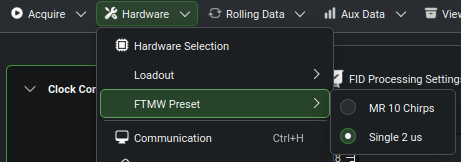
The Hardware → FTMW Preset submenu lists the named presets in the active loadout. The currently selected preset is marked.
See FTMW Preset Submenu for the submenu’s state-gating behavior.
See also
FTMW Configuration — chapter page covering the preset bar and the rest of the dialog
Loadouts — loadouts own the presets and trigger the drift-detection prompt when the hardware map changes